
How do I get access to the Premium Practice Exam after purchase?
Premium access is activated once payment is successfully verified. Verification protects customers from unauthorized transactions and fraudulent use.
Activation Timeline
- Typical: within 1 hour
- Rare cases: up to 6 hours (bank holds, cross-border checks, or processor review)
How to Access Premium
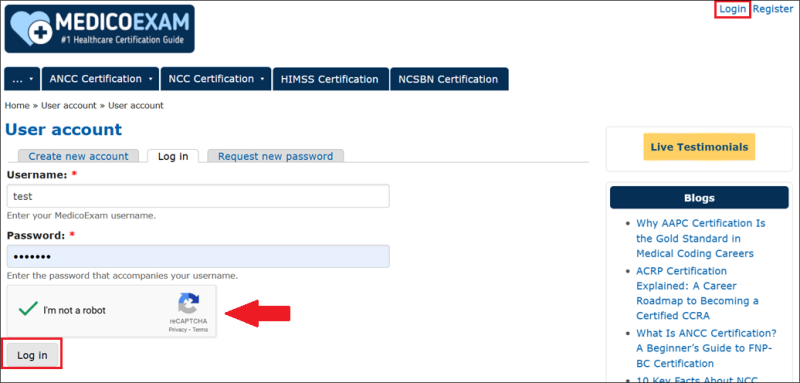
Step 1 — Login to Your Account
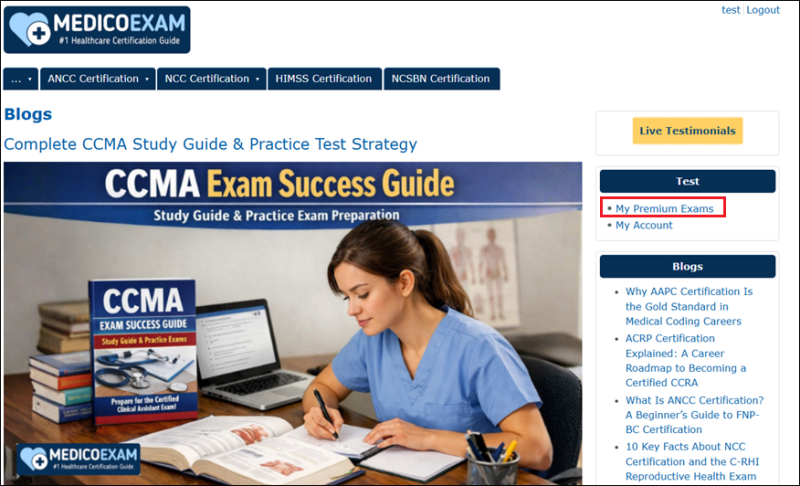
Step 2 — Go to “My Premium Exams”
Shows all exams you purchased and their active validity period.
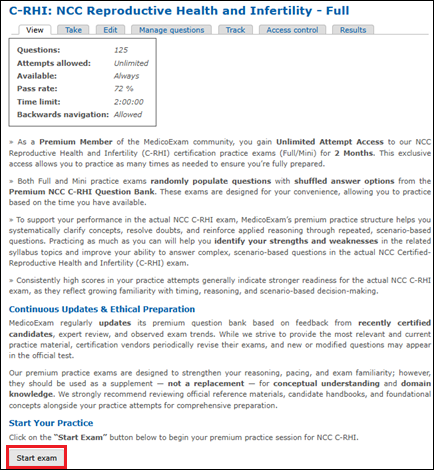
Step 3 — Select Your Certification Practice Exam
e.g., NCLEX RN/PN, ANCC FNP-BC, NCC C-RHI, etc.
Step 4 — Start Simulation
Premium supports both full-length and mini sessions for flexible study.
Why Verification Matters
Payment verification helps prevent:
- Unauthorized card use
- International chargebacks
- Fraudulent access requests
- Automated dispute reversals
Once your order is verified, the Premium Practice Exam will automatically appear in your dashboard under:
My Account → My Premium Exams
Important Notes
- Premium access is not instant; activation occurs after secure verification
- You will see your Premium exams only after activation completes
If Premium has not activated after 6 hours, contact support for assistance.


